Online Reservations · Google Reserve & Ordermoon
Turn Google searches into confirmed tables — 24/7 and with zero missed calls
As a trusted Google Reserve partner, Ordermoon lets guests book a table directly from Google Search, Google Maps, and your website 24/7. And when the phone still rings during a rush, you log the booking by voice in three seconds.

How many tables you quietly lose when bookings rely only on the phone and a paper book
Most diners today decide where to eat at moments when they cannot or do not want to talk on the phone—during a work meeting, on the subway, late at night at 11:00 PM, or while strolling through a new neighborhood as tourists. They open Google Maps, like your restaurant's photos and reviews, and look for the fastest way to secure a table. If the only option is a phone number that goes unanswered after hours or during the lunch rush, a large share of those guests simply move on to the next venue on the list.
Even when someone picks up, dining-room noise often causes misheard names, wrong times, or forgotten notes about a high chair or preferred seating area. A paper notebook at the host stand has another hidden limit: only one person can look at it at a time. Off-site managers cannot see how full tomorrow night is, and at shift handover crossed-out lines easily lead to double-booked tables.
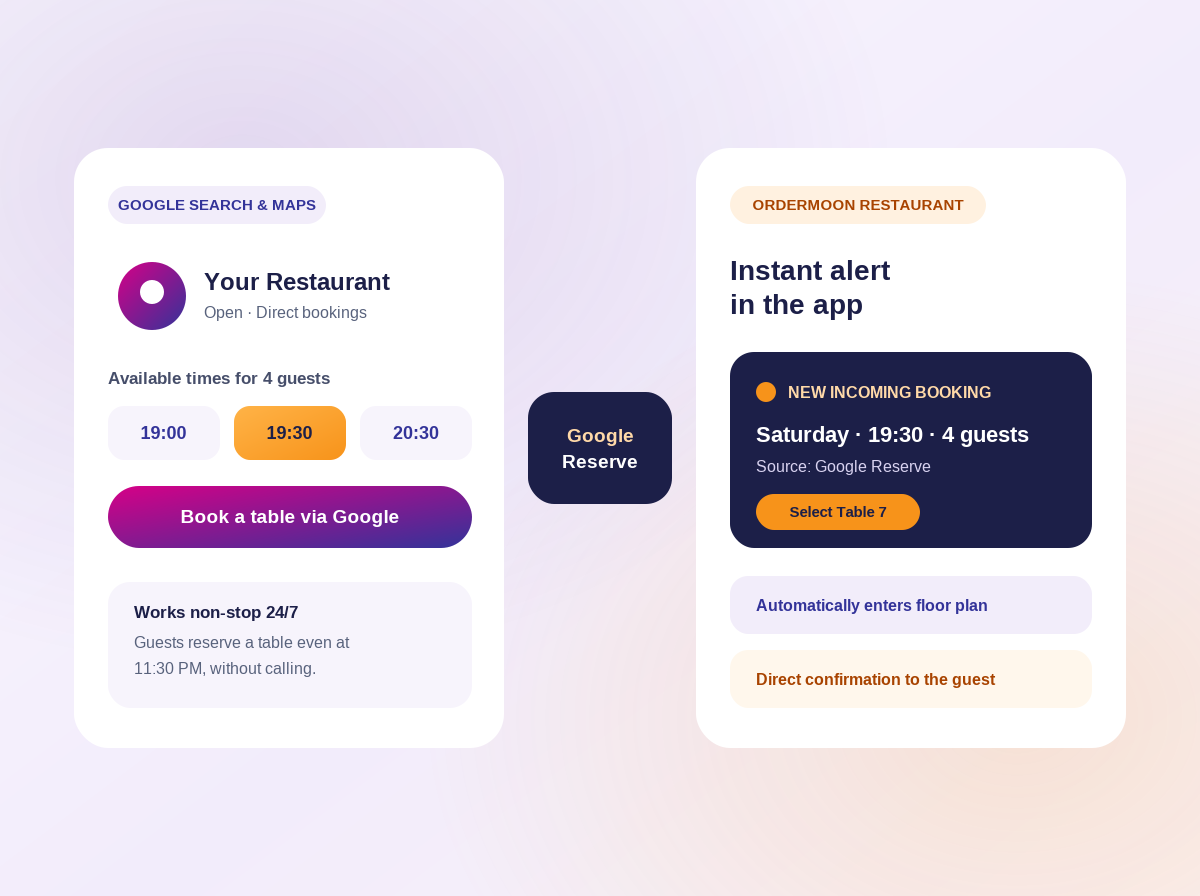
Ordermoon online reservations solve the problem right at the point where diners discover you. Through integration with Google Reserve (part of the Ordermoon and Booky.bg ecosystem), the direct Reserve button sits exactly where people search for a restaurant—on Google Search and Google Maps—and works non-stop 24 hours a day.
They find you on Google and book immediately with no middleman hurdles
When a guest sees your Google Maps listing with a strong Google rating and fresh photos, the booking button guides them through selecting a date, time, and party size in seconds. They do not wait for a callback the next day or send messenger DMs that get buried among dozens of chats. The reservation lands straight inside your Ordermoon Restaurant system, ready to confirm and assign.
An edge for international tourists and corporate guests
International visitors almost never call an unfamiliar local phone number because of language barriers and roaming charges. Offering direct online reservations through Google Reserve and your own website removes that hesitation completely—guests clearly see open time slots and book with confidence, and once seated, you welcome them with your digital QR menu in 20+ languages.

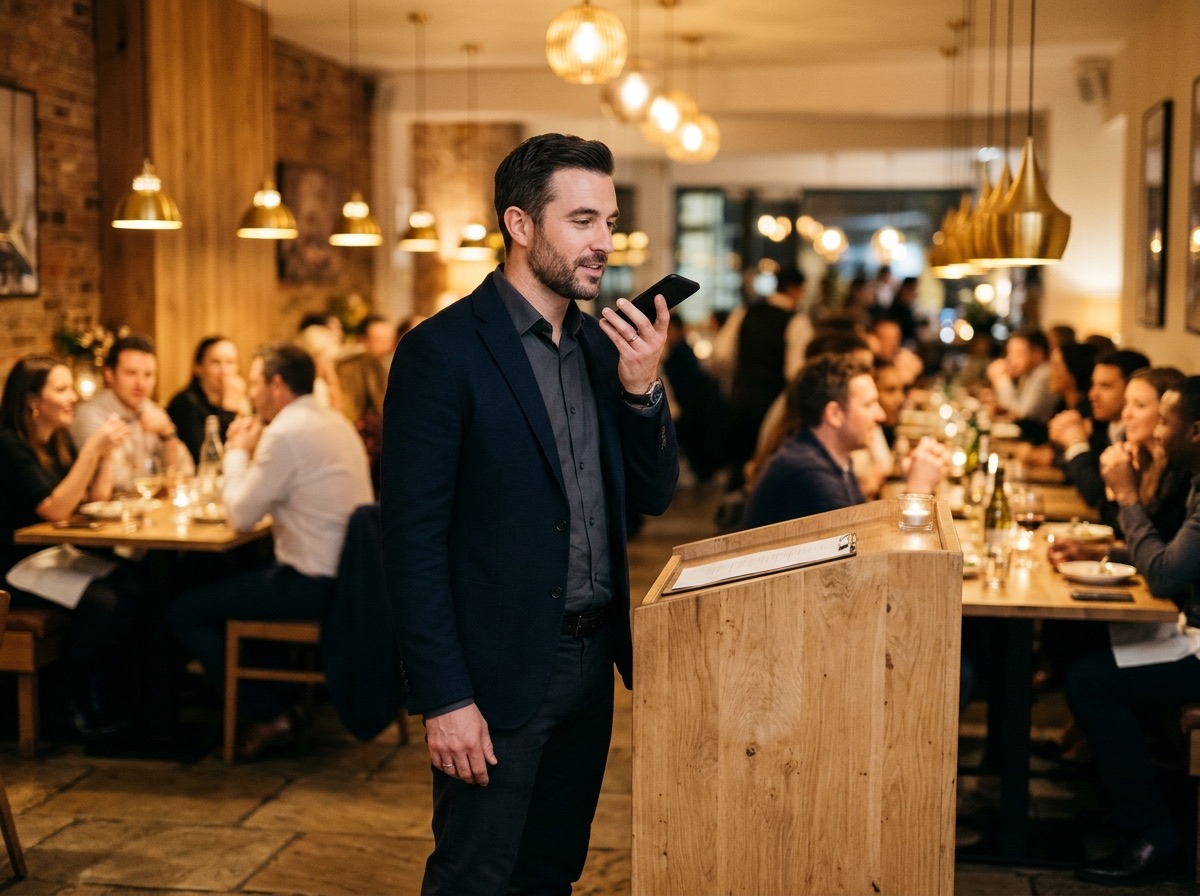
AI voice reservations — speak instead of typing when the room is full
Of course, online bookings do not replace phone calls entirely—especially from regulars, older guests, or groups wanting to arrange a special occasion. The problem with traditional software is that entering a phone reservation manually during the Friday rush takes far too many taps and typing on a tiny keyboard while more guests wait at the door.
That is why Ordermoon offers one of the most practical tools for real floor work: creating reservations by voice. Instead of typing names, times, and notes letter by letter, you simply pick the table in the Ordermoon Restaurant app, tap Reserve, open the microphone, and dictate the guest's name, time, and details. Tap Save, and the table is booked instantaneously.
Speed your staff will actually use on a busy shift
Any restaurant software only works if hosts and managers aren't tempted to bypass it with pen and scrap paper at peak hour. Voice entry makes the digital book faster than a paper pad. Every phone booking goes straight into the shared schedule and is visible to the entire team—not just the person who answered the phone.
Flashing alert for incoming bookings and one-tap calling
When a new online request arrives, the Reservations button in Ordermoon Restaurant flashes clearly so it never goes unnoticed in the bustle of evening service. You open it, choose the best table, and confirm in seconds. If you need to clarify something with the guest—such as running late or switching areas—you can call them straight from the booking screen without hunting through your call log.
Two ways to book in an instant
From a Google Reserve tap or one spoken sentence — straight onto the right table
Try both flows in Ordermoon: how guests reserve a table on their own via Google 24/7, and how your team logs a phone booking by voice in three seconds.
Click another time slot to see how it lands in Ordermoon Restaurant.
“Table 7, four guests, Saturday 20:00, under Daniel Brooks.”
Saturday · 19:30 · 4 guests
The guest gets instant confirmation and the table locks on your floor plan with zero double-booking risk.
How Google Reserve, your website, and the app work as one system
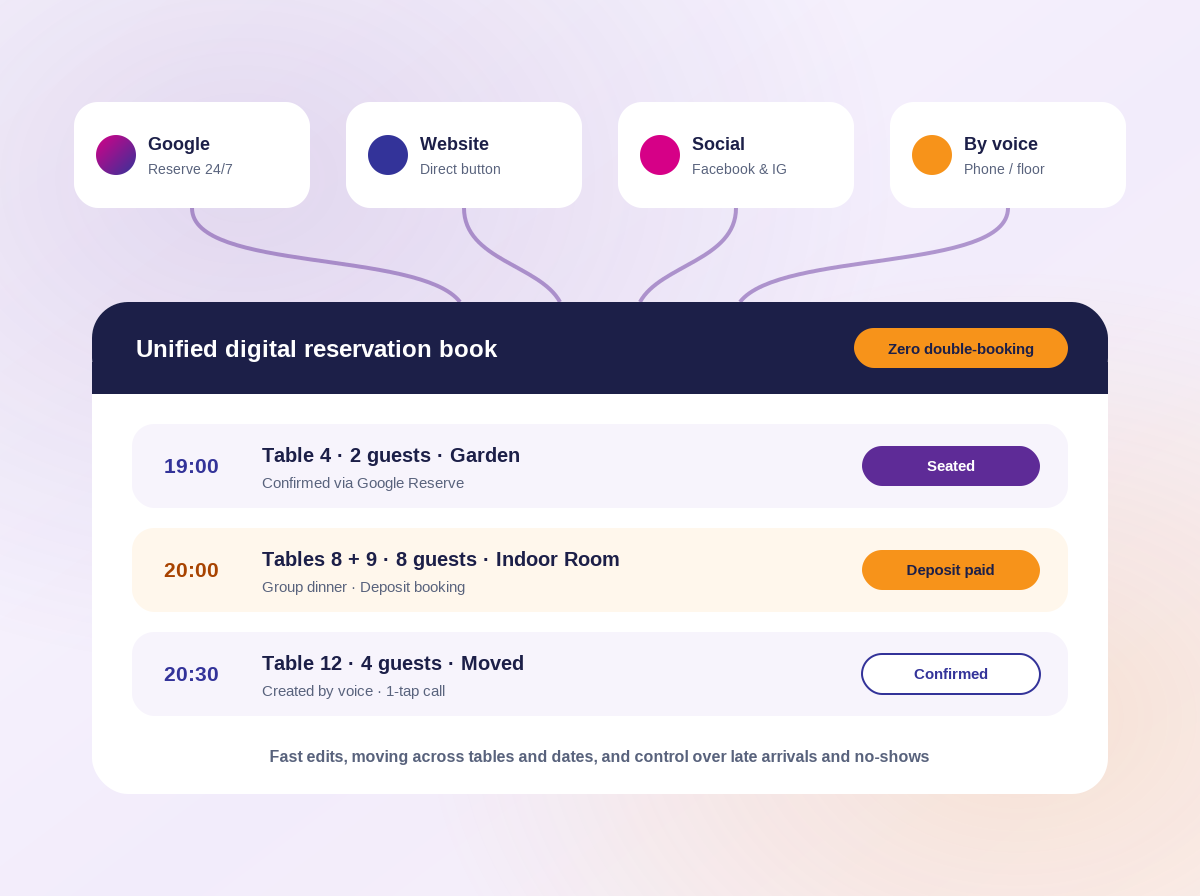
Guests reach your restaurant from different directions: some find you on Google Maps, others browse your official website, others tap from a Facebook or Instagram post, and others call on the phone. When those streams are not gathered in one place, the risk of confirming two parties for the same table at 8:00 PM on Saturday is huge—and a packed room with no free table for a confirmed guest guarantees an ugly conflict at the door.
In Ordermoon, every booking channel flows into one single central book accessible from the Ordermoon Restaurant mobile app (iOS and Android). Every confirmed booking links directly to your live visual floor plan, so the instant a table is booked for a time slot, the whole team sees real-time availability.
Lightning-fast edits, table moves, or date changes without retyping
In hospitality, guest plans change constantly: a party of four becomes six, Friday's booking moves to Saturday, or guests ask to shift from the indoor room to the garden. In Ordermoon, you open the booking, adjust guest count or time in two taps, or move it to another table—even a combination of tables—in seconds. When changing dates, the move tool copies the guest's details onto the chosen open table on the new date without re-entering anything.
Full clarity between day and evening shifts
When the morning manager takes a booking for dinner service or adds a birthday note, the evening crew sees it clearly structured the moment they open the app. No more illegible handwriting, torn scraps of paper, or asking "Who wrote down this table and how many people was it for?".
Calmer prep and staff scheduling
When bookings from Google Reserve, your website, and the phone gather into one accurate schedule days ahead, the benefit goes beyond the front door. In the morning, the head chef already sees how many covers are expected for dinner and whether large parties are booked—making supplier orders and prep precise with less food waste. Meanwhile, the manager decides early if an extra server is needed for a busy weekend rather than scrambling last minute.
Control over late arrivals, no-shows, and optional deposit bookings
There is no more painful loss on a Friday or Saturday night than a "dead" reserved table—you turned away three walk-in parties at the door while holding seats for 8:00 PM, and the guests never show up and never call to cancel. For large groups and holiday nights, a single no-show can wipe out an entire shift's profit.
Ordermoon gives you the tools to bring clear order to front-of-house seating. Inside the digital book you track the exact status of every booking—confirmed, seated, running late, or no-show. When guests arrive, mark them seated in one tap; if they are late, their direct phone number is right at hand so you can check in and release the table on time for waiting diners if needed.
Deposit-backed bookings for peak nights, groups, and holiday dates
For special dates, themed dinners, or large groups, Ordermoon also supports deposit reservations. When guests confirm their commitment upfront, no-show rates drop sharply, the kitchen plans prep far more accurately, and the dining room runs predictably and smoothly.
Part of your venue's complete operational picture
Every reservation connects naturally with Ordermoon's other modules: with table seating for smooth walk-in flow, with online ordering to balance kitchen load, and with full administration, where one screen shows total bookings, orders, and guest activity. Floor management stops being firefighting and becomes a predictable, profitable routine.
Continue with the modules that complement reservations
Open your restaurant to 24/7 bookings via Google Reserve
Contact us for a short demo—we'll show you how bookings from Google, your website, and voice input come together in one easy app on your phone.
Frequently asked questions about online reservations
Answers about Google Reserve, voice bookings, edits, and floor control.
How do guests make a reservation via Google Reserve?
When they search for your restaurant on Google Search or Google Maps, they see a direct Reserve button, choose a date, time, and party size, and submit their booking in seconds—24/7, with no phone call needed.
How do we know right away when a new online reservation arrives?
Inside the Ordermoon Restaurant mobile app, the Reservations button starts flashing whenever a new request comes in. You open it, assign the best table, and confirm in two taps.
Can we enter phone reservations into the same system too?
Yes. You can add a phone booking manually or even faster using Ordermoon's voice feature. Pick a table, tap the microphone, dictate the name, time, and notes, and save.
Is it easy to move a reservation to another table or another day?
Yes. Bookings can be edited and reassigned to another table (or a combination of tables) in seconds, and moved to a different date via copy-and-paste without retyping any details.
Can the system help handle late arrivals and no-shows?
Yes. In the reservation book you mark guests as seated, track statuses like late arrival and no-show, call the guest straight from the app, and optionally require deposits for busy dates and large groups.
Do we need expensive dedicated hardware at the restaurant host stand?
No. Ordermoon Restaurant runs on standard iOS and Android smartphones and tablets, so you can start right away using the devices you already own.